From notebooks and Excel to a system all the staff can use: where to start, what to decide first (cloud or offline, who can access what) and how to make the switch without losing the school year.
Where many schools start from
Students in an Excel sheet, enrolment payments noted in a notebook, report cards filled in by hand at the end of each term. It works while the school is small and one person knows everything. As it grows, the problems begin: data repeated across several files, payments nobody is sure were collected, report cards that take weeks and class lists that have to be redone every time someone changes group.
Digitising isn’t buying computers. It’s making sure each student’s information is in one place, that each person sees what they need and that documents produce themselves.
What to digitise first
You don’t need to do everything at once. This order usually works:
- The student record. Personal details, guardian, emergency contact and medical notes. It’s the foundation for everything else.
- Enrolment and fees. What each family has paid, what they owe and since when. This is what saves the school office the most time and prevents the most arguments.
- Classes, grades and teachers. Who is in which group and who teaches each subject.
- Grades and report cards. With the above in order, the termly report card is generated from the grades instead of being written by hand.
- Communications. Notices and announcements for staff and families.
A key decision: cloud or offline
A cloud system can be used from anywhere, but it depends on the connection working at the very moment the secretary has a family in front of them. A system installed on the school’s local network works even without internet: the server is in the office and the other computers in the school access it through the browser.
Neither option wins in every case. If your school’s connection is stable and you want to check data from home, the cloud makes sense. If the connection often fails, a local system gives peace of mind. In that case, always ask how backups are made, because the data is on a single computer.
Who can see what
A school handles sensitive data: medical information, payment status and the grades of minors. Not all staff need to see everything.
- The head or administration needs the full picture.
- The school office manages students, enrolment and documents.
- Teachers, if they use the system, should only see and edit the grades of their own groups.
Make sure each person logs in with their own username and password, never with a shared account. That way you know who made each change.
The documents that should produce themselves
A good school system saves hours of paperwork. Check that it can generate, ready to print:
- Student ID cards.
- Class lists.
- Termly report cards.
- Each family’s payment history.
How to make the switch without losing the school year
- Pick the right moment. Ideally, start before the school year begins or between terms, never in the middle of exam season.
- Ask how the data you already have will be transferred. Re-entering every student one by one is the heaviest part of the change; it’s worth knowing from the start who does it and how.
- Train the staff. One or two hands-on sessions with the people who will use the system every day are worth more than any manual.
- Keep the old method for a few weeks. During the first month it helps to be able to compare with the Excel sheet in case something doesn’t add up.
- Appoint someone in charge. Someone at the school who knows the tool well and acts as the contact with the provider.
How much it costs
There are two common models: paying for a licence once or paying a recurring fee. With a licence the outlay is higher at the start; with a fee it’s lower at the start, but ongoing. In both cases, ask what’s included: installation, training, updates and what happens when something goes wrong. If you want to understand what drives the price of a software project, read our guide How much does a website or an app cost in Equatorial Guinea?.
How we solve it at BKLN
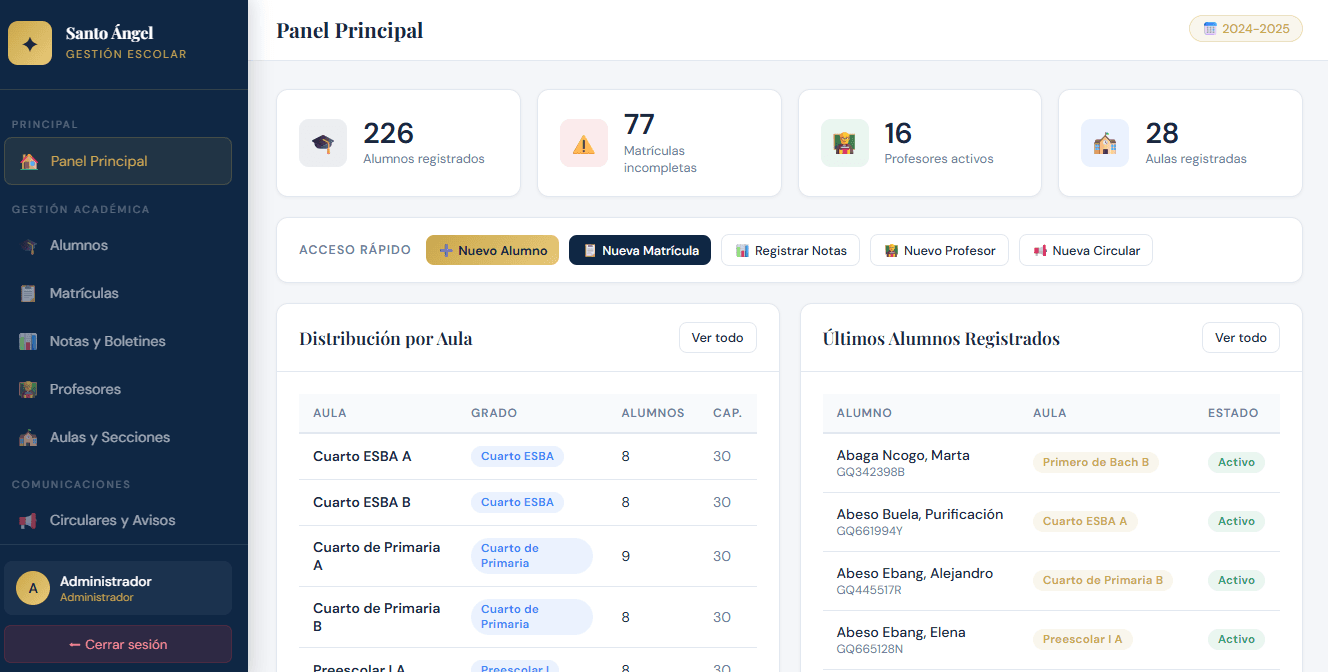
GestEscolar is the school management system we have developed for schools. It works without internet on the school’s local network, is installed on a Windows computer and covers students, enrolment with payment tracking, termly grades, teachers, classrooms and notices. It generates ID cards, class lists, report cards and payment histories ready to print, and includes installation, a manual and two days of staff training.
If you’d like to see it in action, ask us for a demo.